Stepping into the world of competitive gaming, “Wingman in CS2” offers an exciting twist on traditional gameplay. This compact 2v2 mode challenges players to strategize and communicate effectively on smaller maps, making teamwork more critical than ever. With its fast-paced matches and intense action, mastering Wingman requires not only a keen understanding of the game mechanics but also the ability to adapt tactics and weapon choices. Whether you are new to this mode or looking to sharpen your skills, understanding the maps, strategies, and key techniques can make all the difference in dominating your next Wingman match.
Understanding the Wingman Game Mode in CS2
Wingman in CS2 is a popular, fast-paced game mode in Counter-Strike 2, designed for intense two-versus-two battles. Unlike the traditional five-versus-five matches, Wingman offers a more compact and strategic experience, allowing players to focus on teamwork and precision. The mode takes place on smaller, specifically curated maps, which intensifies action and forces players to adapt quickly.
Key features of Wingman in CS2 include:
- 2v2 format: Teams consist of only two players, emphasizing collaboration and communication.
- Reduced map areas: Wingman matches occur on smaller segments of standard maps or entirely unique maps, making every movement crucial.
- Shorter game times: Matches are played in a first-to-nine-rounds format, making it ideal for quick yet thrilling gameplay sessions.
This game mode is perfect for players seeking a competitive, team-oriented experience but without the lengthy commitment of a full match. Whether you rely on your partner’s support or take the lead, mastering Wingman in CS2 requires strategic thinking and seamless coordination to outperform your opponents.
Key Maps Designed for Wingman Mode
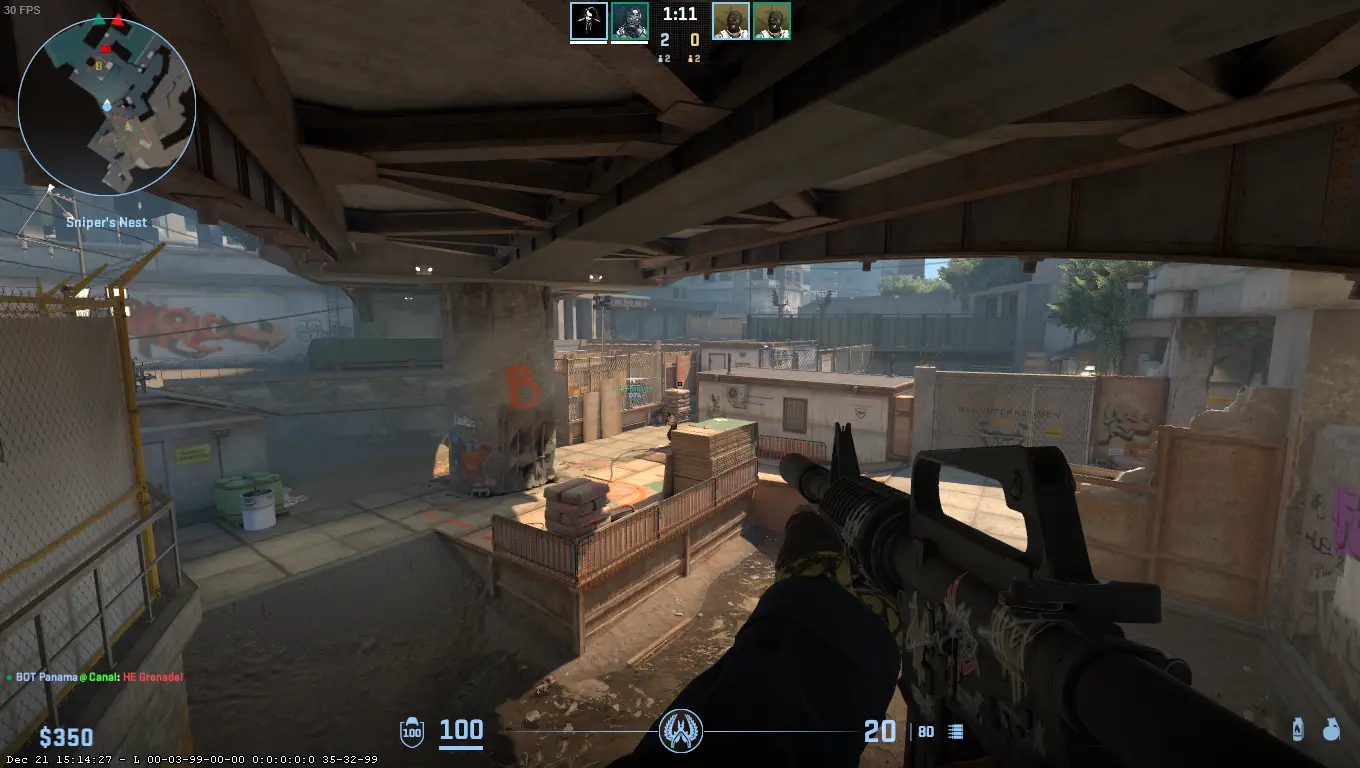
Wingman in CS2 features compact, action-packed maps tailored for intense two-on-two battles. These maps focus on fostering fast-paced gameplay and strategic positioning, making them distinct from traditional five-on-five competitive maps.
Here are some of the key maps designed for Wingman mode:
- Shortdust: A smaller version of the popular Dust II, this map emphasizes frontal engagements and quick rotations. Its tight corners make utilities like flashbangs highly impactful.
- Cobblestone (Wingman): This map retains the medieval charm of Cobblestone while reducing its size, perfect for clutch close-quarters fights.
- Overpass (Wingman): A reimagined Overpass, condensed yet retaining the vertical engagements that make it unique.
- Inferno (Wingman): Known for its iconic Banana area, this downsized Inferno keeps the gameplay intense.
Each map in Wingman mode encourages players to adapt their tactics while coordinating effectively with their partner. The smaller layouts ensure quicker rounds, keeping the gameplay exciting and challenging. Mastering map knowledge is key to success in any Wingman in CS2 match!
Essential Tactics for Success in Wingman Matches
Excelling in Wingman in CS2 requires not only great aim but also smart strategies tailored for its unique gameplay. Here are several essential tactics that can help you secure victory in this intense two-versus-two game mode:
- Map Control: With fewer players, gaining control of key areas on compact maps becomes crucial. Use your utility wisely to block enemy sightlines or flush them out of hiding spots.
- Team Coordination: Stick closely with your partner to ensure trades if one of you is taken out. Always communicate positions and plans to avoid being caught off-guard.
- Play the Clock: In this game mode, anticipation is key. If you’re defending, let the attackers come to you, taking advantage of choke points to hold them off. Meanwhile, as an attacker, avoid rushing blindly—use calculated aggression.
- Adapt Your Strategy: Every match will vary based on your opponents’ playstyles. Adjust your approach by observing their habits and exploiting weaknesses.
Master these tactics, and you’ll find yourself consistently improving in Wingman in CS2 battles!
How to Communicate Effectively with Your Partner
Strong communication is the backbone of success in Wingman in CS2. Since this 2v2 game mode relies heavily on teamwork, coordinating with your partner can make the difference between victory and defeat. Here are some essential tips for effective communication:
- Share Information Immediately: Call out enemy locations, utility use, or any sounds you hear. For example, letting your partner know you hear footsteps can help position better.
- Use Clear and Concise Language: Avoid lengthy descriptions. Short phrases like “one B, planting” or “flash mid” are quicker and easier to process during a match.
- Plan Before the Round: Discuss your strategy during the preparation phase, whether you’re splitting up or attacking a bomb site together. Clear planning reduces confusion mid-round.
- Support Calls: If you’re in trouble, alert your partner for backup instead of engaging solo.
Lastly, try to stay calm, even in high-pressure moments. Confidence and clarity will enhance both your own gameplay and that of your partner, driving better results in Wingman in CS2.
Tips for Choosing Weapons and Utility in Wingman
Selecting the right weapons and utility plays a crucial role in succeeding at Wingman in CS2. Given the smaller maps and 2v2 format, your choices must balance firepower and strategic utility. Here are some tips to guide your decisions:
- Weapons: Opt for weapons that excel in close to medium-range combat since Wingman maps often favor tighter spaces and faster engagements. Popular choices include:
- Rifles like the M4 or AK for high damage and versatility.
- SMGs such as the MP9 or MAC-10 for quick movement and affordability.
- Shotguns, particularly the Nova or MAG-7, for close quarters.
- Utility: Effective use of grenades can turn the tide of a match. Consider:
- Flashbangs to blind opponents in tight chokepoints.
- Smokes to block sightlines, especially near bomb sites.
- Molotovs or incendiaries to clear or block critical areas.
Lastly, always adapt your weapons and utility to your team’s economy and strategy. Choosing the right gear not only enhances your performance but also gives you an edge in Wingman in CS2.
Improving Your Skills in Wingman Mode
Improving your performance in Wingman in CS2 requires a combination of practice, strategy, and effective communication. Here are some tips to help you elevate your gameplay:
- Master the maps: Wingman maps are smaller compared to standard maps, so knowing every nook and corner is crucial. Focus on learning choke points, hiding spots, and bombsite positioning.
- Work on aim and accuracy: Winning 2v2 scenarios often relies on quick eliminations. Spend time in aim-training maps or practice modes to sharpen your reflexes.
- Develop teamwork: Success in Wingman in CS2 hinges on good coordination with your partner. Practice strategies like splitting up to gather intel and regrouping for site execution.
- Review your matches: Analyze past matches to identify mistakes. Did you lose a round due to poor positioning or bad utility usage? Learning from these errors can make a difference.
- Experiment with setups: Try different weapons and utilities to find combinations that suit your playstyle. A well-coordinated flashbang or smoke can turn the tide of battle.
Through consistent practice and adaptability, improving your skills in Wingman mode becomes an achievable goal.
Frequently Asked Questions
What is the primary objective of Wingman mode in CS2?
Wingman in CS2, or Counter-Strike 2, is a competitive mode played in pairs (2v2). The primary objective is the same as in standard Counter-Strike gameplay – one team attempts to plant the bomb while the other team focuses on defending the site and preventing a successful plant or defusing the bomb after it’s planted. However, the maps are smaller, making for quicker and more intense rounds.
How are the maps different in Wingman mode compared to standard CS2 maps?
Maps in Wingman mode are much smaller and more condensed than those in standard CS2 modes. They usually feature a single bombsite rather than multiple sites. This design encourages faster-paced matches and provides a more strategic focus on one particular area, making map knowledge critical for success in Wingman matches.
What are some good tactics for Wingman matches in CS2?
In Wingman matches, communication and teamwork between the two players are crucial. Effective strategies include taking control of key chokepoints, using flashbangs to blind opponents, and holding advantageous angles. Additionally, players should coordinate their utilities, such as smokes, to block potential lines of sight. Learning the map thoroughly also gives players an edge in predicting enemy positions and planning their movements.
How does ranking work in Wingman mode?
Ranking in Wingman mode operates similarly to the standard matchmaking ranking system in CS2. Players are rewarded with a rank based on their performance in matches over time. Winning games, especially against higher-ranked opponents, results in better rank progression. However, consistent losses or poor performance against lower-ranked players can lead to a rank decrease. As it’s a 2v2 game mode, individual impact has a significant influence on your overall rank.
For a second look at cash market prices, open live CS2 skin prices on CSOffer me. Skin.Trade stays the place to buy CS2 skins or sell CS2 skins.