If you’re a fan of Counter-Strike 2, you know that weapon skins are more than just cosmetic; they’re a statement. Among the highly sought-after items, Navaja Knife Skins in CS2 stand out for their unique designs and appeal. Whether you’re a seasoned player or new to the game, choosing the best skin can elevate your loadout to the next level. In this guide, we’ll explore the top 10 Navaja Knife Skins, their features, and why they’ve become such an iconic part of CS2 gameplay. Prepare to discover your next favorite knife skin!
What are Navaja Knife Skins in CS2?
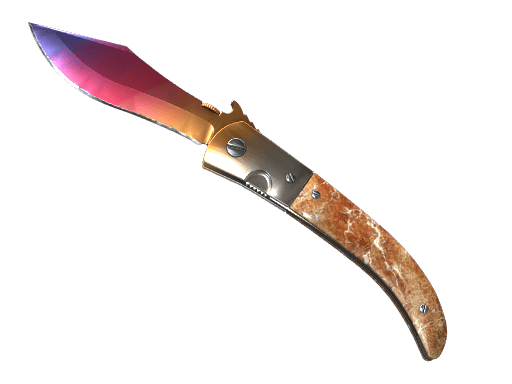
Navaja Knife Skins in CS2 are cosmetic items designed to enhance the appearance of the iconic Navaja knife in the popular game, Counter-Strike 2 (CS2). These skins are purely aesthetic, offering no gameplay advantages, but they allow players to showcase their unique style and preferences.
The Navaja knife, known for its compact and elegant design, has become a favorite among players. With the introduction of skins, it gains a visual upgrade, making it stand out in the game. Each skin features distinct patterns, color schemes, and finishes, ranging from simplistic, modern designs to intricate, artistic concepts.
Some popular finishes for Navaja Knife Skins in CS2 include:
- Fade: A gradient-based, colorful finish.
- Marbleized: Complex patterns mimicking marble textures.
- Doppler: Shiny, gem-like surfaces in a range of hues.
These skins help players personalize their knives and are often sought after due to their rarity and trading value. Whether you are a collector or just want to add some flair to your gameplay, Navaja Knife Skins in CS 2 offer endless creative possibilities.
Factors That Make a Great Navaja Knife Skin
Not all Navaja Knife Skins in CS2 are created equal, and certain features make some skins standout favorites among players. When evaluating these skins, consider the following factors:
1. Visual Appeal:
- Vibrant designs, unique patterns, and engaging color schemes can elevate a skin’s aesthetic value.
- Popular options often include rare color combinations or exclusive designs.
2. Rarity:
- Navaja Knife Skins in CS2 with higher rarity levels tend to be more sought after.
- Rare skins not only look impressive but also enhance a player’s prestige in the community.
3. Float Value:
- Skins with lower float values look cleaner and are usually more valuable.
- Factory New and Minimal Wear skins are particularly desirable.
4. Personal Preferences:
- Some players prioritize themes or designs that align with their personal tastes or other skins they own.
- A cohesive loadout can create a visually striking statement in the game.
5. Market Value:
- Exclusive Navaja Knife Skins in CS 2 can fetch higher prices, making them a wise investment for collectors.
Understanding these factors helps you decide which skins best match your style while adding to your collection’s value.
Top 10 Navaja Knife Skins Ranked in CS2
When it comes to Navaja Knife Skins in CS2, certain designs stand out due to their popularity, rarity, and overall aesthetic appeal. Below is a ranking of the top 10 skins that have captivated players:
- Navaja Knife | Marble Fade
A vibrant mix of red, blue, and yellow, perfect for collectors. - Navaja Knife | Tiger Tooth
Bold, golden waves resembling a tiger’s majestic stripes. - Navaja Knife | Damascus Steel
Sleek, metallic patterns for a classic yet elegant look. - Navaja Knife | Doppler (Phase 4)
Dark, cosmic tones with a hint of purple and pink. - Navaja Knife | Slaughter
Classic red with chaotic, sharp white patterns. - Navaja Knife | Vanilla
Uncoated simplicity that appeals to minimalists. - Navaja Knife | Crimson Web
A red blade accented with web-like black lines. - Navaja Knife | Fade
Smooth gradient transitions of pink, purple, and gold. - Navaja Knife | Urban Masked
A camo-inspired skin, perfect for stealth aesthetics. - Navaja Knife | Night Stripe
Dark and mysterious with a subtle striped finish.
These Navaja Knife Skins in CS2 not only enhance your gameplay visuals but also reflect your unique style. Choose one that matches your flair!
How to Obtain Navaja Knife Skins in CS2
Obtaining Navaja Knife Skins in CS 2 can feel like an adventure on its own! These dazzling skins are available through several methods, offering players a range of opportunities to customize their knives. Below are the main ways you can get them:
- Opening Cases: This is the most common way to acquire Navaja Knife Skins in CS2. Purchase weapon cases, unlock them with keys, and hope for the rare drop of a Navaja knife.
- Steam Market: The Steam Community Market allows you to browse and purchase your favorite skins directly. You can filter by condition, style, and price to find your perfect pick.
- Trading with Players: Engage in skin trades with others in the community. Be sure to evaluate the skin’s float value and desirability before finalizing any deals.
- Third-Party Sites: Some external platforms offer skins, but exercise caution and ensure the site’s legitimacy.
Each of these options has its pros and cons. For example, opening cases relies on chance, but it might reward you with high-value skins. In contrast, the market and trading give you more control over your purchase. Choose wisely to enhance your CS2 collection!
History and Popularity of Navaja Knives in CS2
The Navaja Knife Skins in CS 2 have a rich history tied to their unique design and widespread appeal among gamers. First introduced in Counter-Strike: Global Offensive (CS:GO), the Navaja Knife quickly captured attention due to its compact, fan-favorite appearance inspired by traditional Spanish folding knives.
In Counter-Strike 2 (CS2), the popularity of Navaja Knife Skins continues to grow as players seek distinctive customization options. With its agile design and elegant animations, the Navaja Knife complements a wide range of skins, making it a staple for collectors. Furthermore, the availability of vibrant patterns and rare finishes has elevated the weapon’s status in the trading market.
Here’s why Navaja Knives remain prominent in CS2:
- Compact Design: The knife’s sleek look appeals to minimalist preferences.
- Affordable Options: Its skins often provide budget-friendly choices for new players.
- Rarity and Variety: Rare patterns, such as Doppler or Marble Fade, attract collectors.
As CS2 evolves, Navaja Knife Skins in CS2 continue to connect style, utility, and nostalgia, ensuring their lasting place in the game’s community.
Tips for Showcasing Your Navaja Knife Skins
Owning Navaja Knife Skins in CS 2 is one thing, but showcasing them effectively elevates your in-game presence. Follow these tips to highlight your prized skins like a pro:
- Use Matching Loadouts: Coordinate your weapon skins with your Navaja Knife to create a visually cohesive loadout. This draws attention to your knife while maintaining a stylish overall aesthetic.
- Showcase in Knife Rounds: During warm-ups or knife rounds, take the opportunity to display your blade. Spinning movements and casual animations can make your skin shine.
- Play Strategically with View Models: Adjust your view model to keep your skin in focus. Bring the knife into prominent visibility by repositioning your field of view (FOV).
- Capture Screenshots: Snap high-quality screenshots of your Navaja Knife Skins in CS 2 in action. Share them with the community through forums, Reddit, or social media.
- Inspect Often: The “Inspect” feature lets you show off intricate details and patterns of your skin, impressing teammates and opponents alike.
By using these strategies, your Navaja Knife Skins can truly stand out in the competitive world of CS2. Always play with style!
Frequently Asked Questions
What are Navaja Knife skins in CS2?
Navaja Knife skins in CS 2 are cosmetic items in the popular game Counter-Strike 2 that change the appearance of the Navaja Knife, giving players the option to personalize their in-game items.
How can I get Navaja Knife skins in CS2?
You can obtain Navaja Knife skins in CS 2 through methods such as opening cases, purchasing them on the Steam Marketplace, or trading with other players in the game.
What should I consider when choosing a Navaja Knife skin?
When choosing a Navaja Knife skin, consider factors like its visual appeal, rarity, condition (Factory New, Battle-Scarred, etc.), and its price, which can vary depending on demand and availability.
Are the Navaja Knife skins purely cosmetic?
Yes, Navaja Knife skins in CS 2 are purely cosmetic and do not affect the gameplay mechanics or provide any competitive advantage. They are meant for aesthetic purposes only.
After you shortlist a finish, compare Navaja Knife prices on CSOffer me and complete the trade on Skin.Trade.