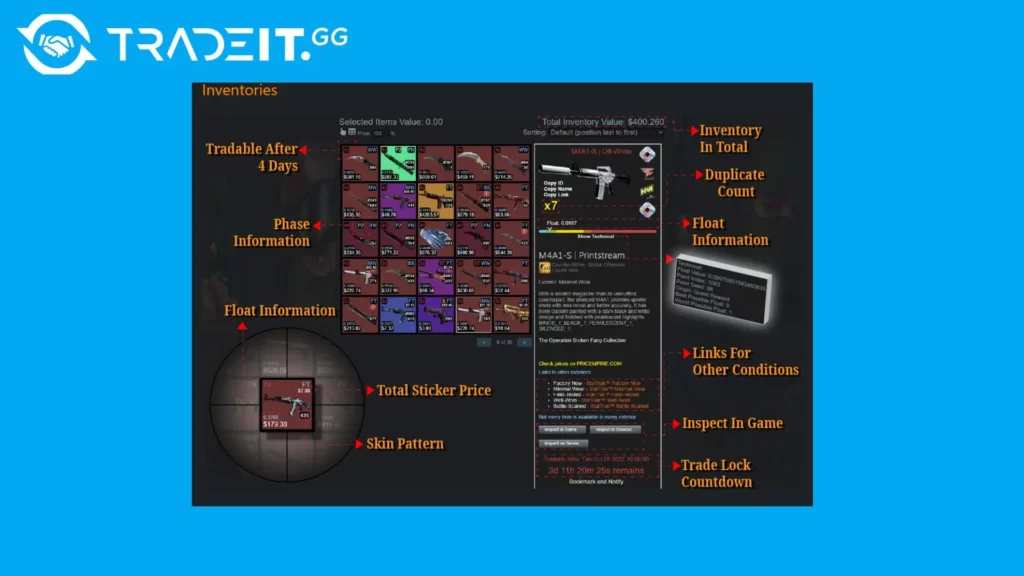
Navigating the world of CS2 Trading Extensions can greatly enhance your in-game trading experience, especially with the growing number of options available in 2025. These tools offer valuable features such as improved inventory management, secure transactions, and market trend tracking, making them indispensable for both seasoned traders and newcomers. By utilizing the right extensions, you not only streamline your trading process but also protect yourself against potential scams. In this post, we’ll explore the best CS2 Trading Extensions available, their top features, and how they can help you stay ahead in the competitive CS2 marketplace.
Top Features to Look for in CS2 Trading Extensions
Choosing the right CS2 Trading Extensions can significantly enhance your trading experience. In 2025, the top trading tools offer a variety of features tailored for efficiency, security, and usability. Here are some must-have capabilities to consider before making your choice:
- Ease of Use: A clean UI with intuitive navigation is essential, especially for those new to trading. User-friendly design allows quick access to vital features.
- Security Enhancements: Trusted extensions implement two-factor authentication and encryption to safeguard your trades.
- Trade Automation: Many CS2 Trading Extensions now provide automated functions, such as instant price calculations or auto-accepting trades at pre-set conditions.
- Advanced Market Analytics: Tools offering detailed market trend insights give you a competitive edge by identifying the best trading opportunities.
- Integration with Trading Platforms: Smooth integration ensures seamless transactions and minimizes errors while trading with other users.
By selecting an extension with these features, you can streamline your trading process while boosting security and convenience. Always weigh the tools’ benefits before committing to one.
How CS2 Trading Extensions Improve Your Inventory Management
Managing your CS2 inventory effectively can be challenging, especially with a large collection of skins and items. Luckily, CS2 Trading Extensions offer several features to streamline the process and enhance your gaming experience.
Here’s how these tools help with inventory management:
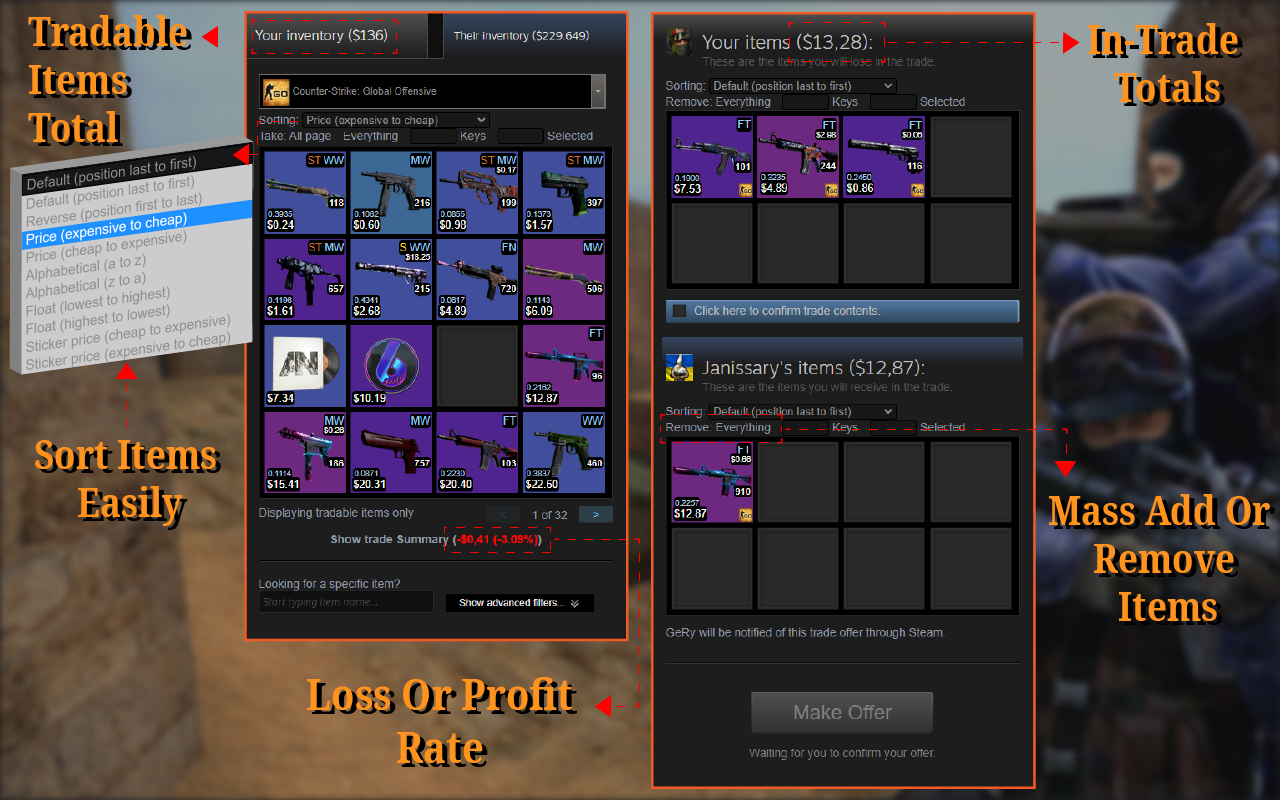
- Organized Display: Many trading extensions use advanced filters and sorting options, allowing you to categorize skins by price, rarity, or type effortlessly.
- Automatic Valuation: Extensions often include price-check tools that provide real-time estimates for your items, helping you understand their market worth.
- Quick Search: Save time by searching for specific skins or items directly within your inventory using keyword-based functionalities.
- Trade Suggestions: Some CS2 Trading Extensions highlight the best trade offers, ensuring you maximize the value of your assets.
- Inventory Alerts: Get notified when the value of a particular item rises or drops, enabling smarter trade decisions.
These features not only simplify inventory organization but also provide insights into market trends, making CS2 Trading Extensions an essential tool for every gamer.
Best-rated CS2 Trading Extensions for Secure Transactions
When trading valuable in-game items, security is paramount. The best-rated CS 2 Trading Extensions offer robust features to ensure safe and hassle-free exchanges. Here are key highlights to look for in secure trading tools:
- Two-Factor Authentication (2FA): Extensions with 2FA add an extra layer of protection to your trades, preventing unauthorized access.
- Verified Trading Platforms: Opt for extensions that support verified platforms, reducing the risk of scams and fraudulent activities.
- Real-Time Trade Alerts: Notifications for trade updates help users track every step of the transaction process.
- Encryption Protocols: Advanced encryption keeps sensitive data like login credentials and trade history protected.
Additionally, the best extensions integrate fraud detection tools that analyze unusual patterns. Choosing well-reviewed CS 2 Trading Extensions can make a significant difference in safeguarding your inventory.
For 2025, expect further advancements like blockchain technology to reinforce transaction transparency. Prioritize extensions that address security concerns without compromising on usability. With the right tool, you can focus on trading confidently while keeping your items and data safe.
User-friendly CS2 Trading Tools for Beginners
For new players stepping into the world of CS2 trading, navigating through vast inventories and market trends can feel overwhelming. This is where user-friendly CS2 Trading Extensions come into play, simplifying the process for beginners and providing an intuitive trading experience.
What makes these tools beginner-friendly? Consider the following key features:
- Simple Interface: Clear menus and minimalistic layouts ensure easy navigation for newcomers.
- Guided Tutorials: Extensions with step-by-step guides or interactive tutorials help users understand trading basics.
- Quick-Filter Options: Find items effortlessly by using filters for quality, price, rarity, or type.
- Preview Functions: Visualize item appearances before trading, ensuring you’re making the right choice.
- Fair Trade Indicators: Some tools alert beginners to imbalanced trades, helping to avoid unfavorable deals.
Such user-friendly features in CS2 Trading Extensions not only shorten the learning curve but also boost confidence for first-time traders. These tools are your gateway to mastering trading in CS2 without any hurdles, making them indispensable for new players in 2025.
Extensions for Tracking Market Trends in CS2
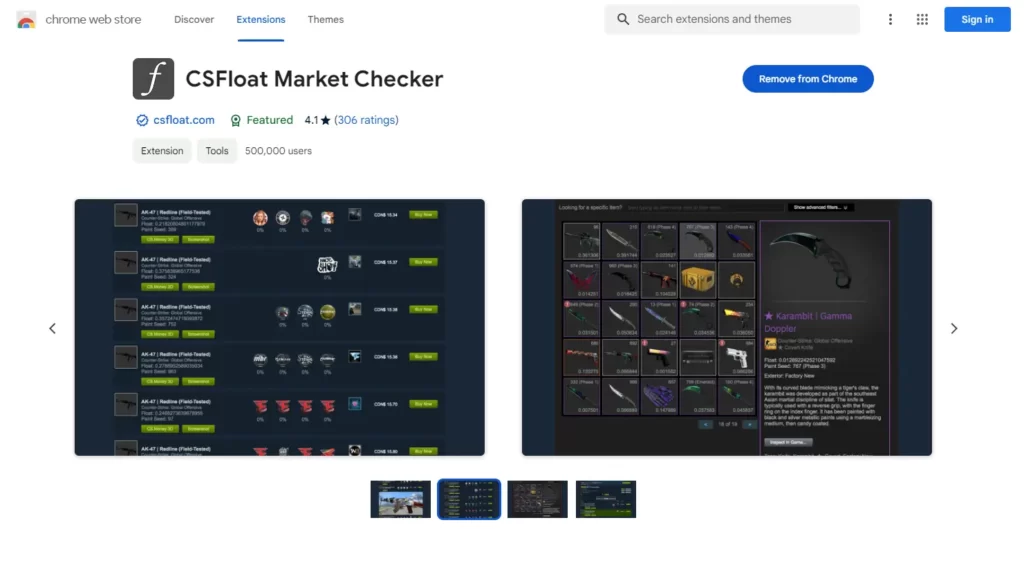
In 2025, staying ahead in CS2 trading requires a solid understanding of market trends. Thankfully, CS2 Trading Extensions offer advanced tools to help traders track these trends efficiently. Such extensions analyze in-game market dynamics, providing crucial insights at your fingertips.
Here’s what to expect from market trend tracking features in popular trading extensions:
- Real-Time Price Updates: Keep tabs on item values in real-time, ensuring you never miss profitable trades.
- Historical Data Analysis: Access past market data to recognize patterns and make informed predictions about future trading trends.
- Visual Graphs and Heatmaps: Extensions often include visual representations, making it easy to spot price fluctuations and demand changes at a glance.
- Customizable Alerts: Receive notifications for price spikes or dips, allowing you to act quickly and maximize profits.
By leveraging these tools, both new and experienced traders can make data-driven decisions with confidence. These CS2 Trading Extensions not only enhance your ability to keep up with the evolving market but also provide a competitive edge in the trading ecosystem.
How to Avoid Scams with Trusted CS2 Trading Extensions
Preventing scams is a top priority for any trader using CS2 Trading Extensions. With numerous options available, it’s crucial to rely on trusted tools to safeguard your virtual assets. Here’s how you can minimize risks:
- Verify the Source: Only download CS2 Trading Extensions from official or well-known marketplaces. Avoid third-party websites.
- Check User Reviews: Read feedback and ratings from other users to identify potential red flags or common issues.
- Secure Authentication Methods: Opt for extensions offering two-factor authentication (2FA) or similar security measures to protect your account.
- Real-Time Alerts: Trusted extensions notify users of suspicious trading activities, ensuring quicker responses to potential risks.
- Encrypted Transactions: Always prioritize tools that guarantee end-to-end encryption of trade data.
Additionally, stay updated with CS2 community forums to learn about recent scams or vulnerable extensions. Trusted CS2 Trading Extensions not only enhance your trading experience but also act as a shield against fraud. By choosing wisely and staying vigilant, you can enjoy secure and hassle-free trading.
Future Developments in CS2 Trading Extensions for 2025
The evolution of CS2 Trading Extensions in 2025 promises to bring exciting innovations that will enhance the trading experience for players worldwide. With constant technological advancements, these extensions are expected to become more intuitive, secure, and efficient.
Here are some advancements to look forward to in 2025:
- AI Integration: Expect smarter trading bots that can suggest optimal trades based on market trends and personal preferences.
- Enhanced Security Features: Biometric authentication and advanced encryption methods will make transactions safer.
- Cross-Platform Compatibility: New extensions may support seamless trading across PC, console, and mobile devices.
- Customizable Dashboards: Tailor the interface to track market updates, monitor inventory, and evaluate trades all in one place.
Furthermore, real-time analytics tools integrated into CS2 Trading Extensions will allow users to make data-driven decisions swiftly. These developments aim to simplify the trading process and create a more reliable marketplace for all users.
As 2025 unfolds, these future-forward enhancements will likely revolutionize how gamers interact with their CS2 collections. Stay tuned for updates as these innovations begin to transform the trading landscape.
Frequently Asked Questions
What are CS2 trading extensions?
CS2 trading extensions are browser-based tools or plugins designed for Counter-Strike 2 (CS2) players to make in-game item trading more efficient and streamlined. These extensions often help users find the best deals, compare item prices, automate repetitive tasks, and provide additional features like trade history tracking, item price prediction, or community-driven trading insights.
Are CS2 trading extensions safe to use?
Yes, most CS2 trading extensions that are popular and well-reviewed are safe to use. However, users must be cautious and download extensions only from reputable sources, such as official Chrome or Firefox web stores. Avoid granting unnecessary permissions to extensions and check reviews or feedback from other users to ensure security. Additionally, steer clear of extensions that ask for sensitive information like your Steam login credentials.
What are the best features to look for in CS2 trading extensions?
When choosing a CS2 trading extension, look for features such as real-time item pricing, automated trade recommendations, user-friendly interfaces, and the ability to filter or sort trade offers. Security features, such as encryption and fraud protection, are also essential. Advanced functionalities, like trade history tracking and integration with third-party trading platforms, can significantly add value for dedicated traders.
Do I need to pay for CS2 trading extensions?
Most CS2 trading extensions are free to use, but some may offer premium features or subscriptions for advanced tools. These premium versions often include exclusive benefits like more accurate item price predictions, priority customer support, or ad-free experiences. If you are an avid trading enthusiast, investing in premium features can be worthwhile. However, free versions are usually sufficient for casual users.
After you shortlist a finish, compare live CS2 skin prices on CSOffer me and complete the trade on Skin.Trade.